
Progrogramming
Basics
- Introduction
- Why Computers Were Invented?
- How Computers Work?
- What Can a Computer Actually Do?
- Programming Languages
- Programming Terminology
- Programming Terminology Grouping
- Storage Family
- Task Execution Family
- Input & Output Family
- Decision Family
- Repetition Family
- Collection Family
- Object-Oriented Programming (OOP)
- Access & Security Fundamentals
- Understanding Errors and Exception Handling
- How Applications Communicate Using APIs
- Understanding Databases
- Understanding Web and App Flow
- Understanding File Systems
- Understanding the Development Process
- Understanding Team Collaboration
- Understanding Software Performance
- Understanding the Mobile App Ecosystem
- How Websites Reach Your Screen
- How Computers Learn Like Humans
- Why Some Programming Terms Appear Everywhere
Lesson 8
How Computers Turn Instructions into Results
Every successful result begins with a task, follows a plan, executes instructions, and delivers an outcome.
🤔 Why This Matters
In the Storage Family, we learned how computers store information.
But storing information alone does not solve problems.
A computer becomes useful only when it can perform work.
Think about everyday life.
🍽️ Making breakfast
📧 Sending an email
🧾 Generating a report
🛒 Placing an online order
🎵 Playing a song
All these activities start with a goal and end with a result.
Computers work in exactly the same way.
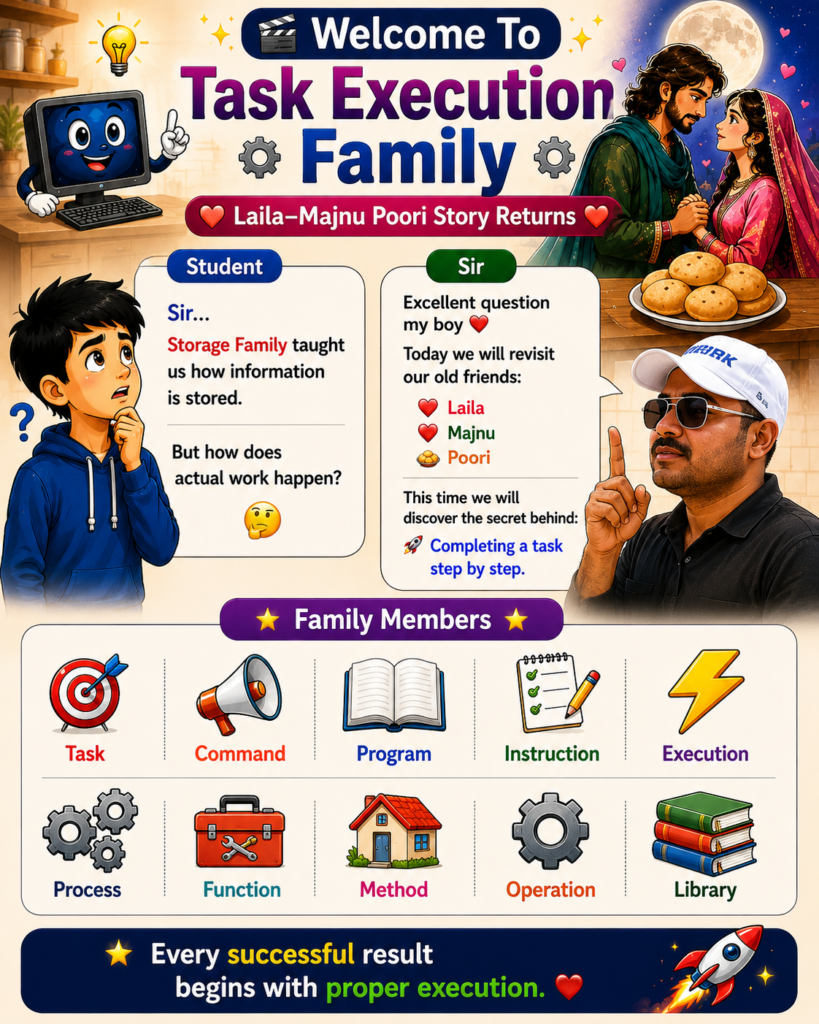
Whenever we ask a computer to do something, a complete execution journey begins.
Understanding this journey helps us understand many programming terms that often seem confusing.
Remember Forever ❤️
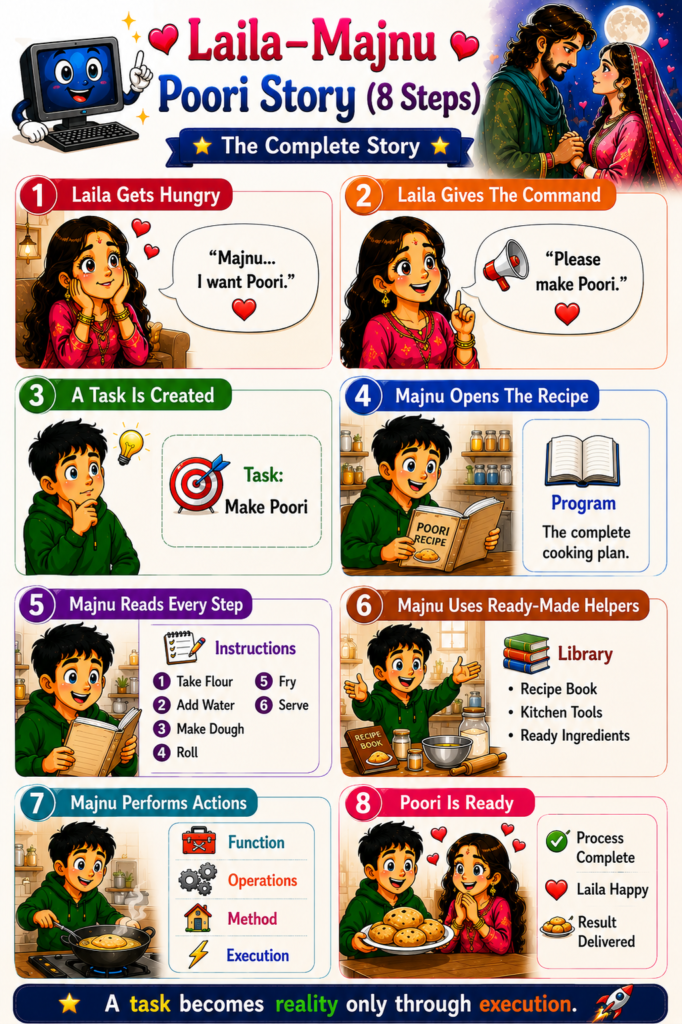
Imagine Laila wants Poori.
❤️ Laila makes a request.
📢 Majnu receives the request.
📖 He opens the recipe.
📝 He follows each step.
🍳 He cooks.
🎉 Poori becomes ready.
Computers follow the exact same pattern.
Every result is simply a well-executed set of instructions.
⸻
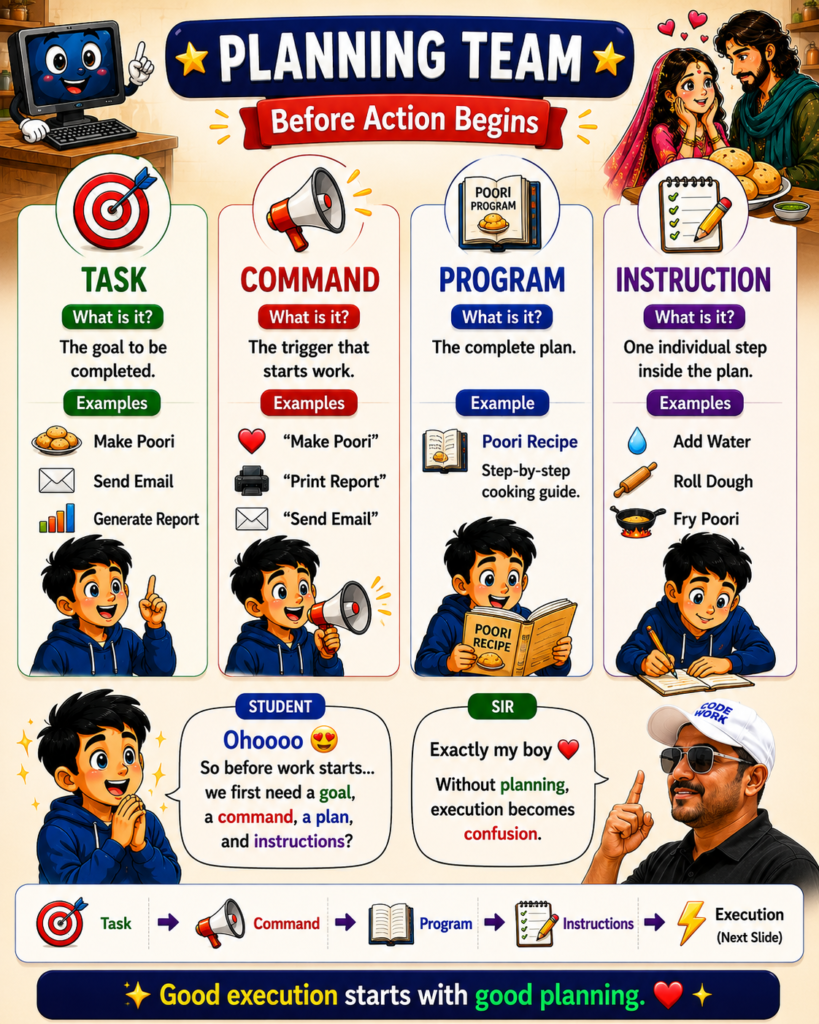
🎯 Task
A Task is the goal that must be completed.
Examples:
🍽️ Make Poori
📧 Send Email
🧾 Generate Report
📊 Create Chart
💳 Process Payment
A task answers:
👉 What needs to be accomplished?
Without a task, there is no direction.
⸻
📢 Command
A Command is the trigger that starts the work.
Examples:
🖱️ Click Submit
⌨️ Press Enter
📧 Send Email
🖨️ Print Report
💾 Save File
A command tells the system:
👉 Start working on this task now.
⸻
📖 Program
A Program is the complete plan used to finish a task.
Just as a recipe contains cooking steps, a program contains execution steps.
Examples:
🍳 Poori Recipe
📧 Email Sending Program
🛒 Shopping Checkout Program
🏦 Banking Transfer Program
A program answers:
👉 How will the task be completed?
⸻
📝 Instruction
Instructions are the individual steps inside a program.
Poori Recipe Example:
1️⃣ Take Flour
2️⃣ Add Water
3️⃣ Make Dough
4️⃣ Roll Dough
5️⃣ Fry Poori
6️⃣ Serve
Computers execute instructions one by one.
Large software is simply thousands of instructions organized together.
⸻
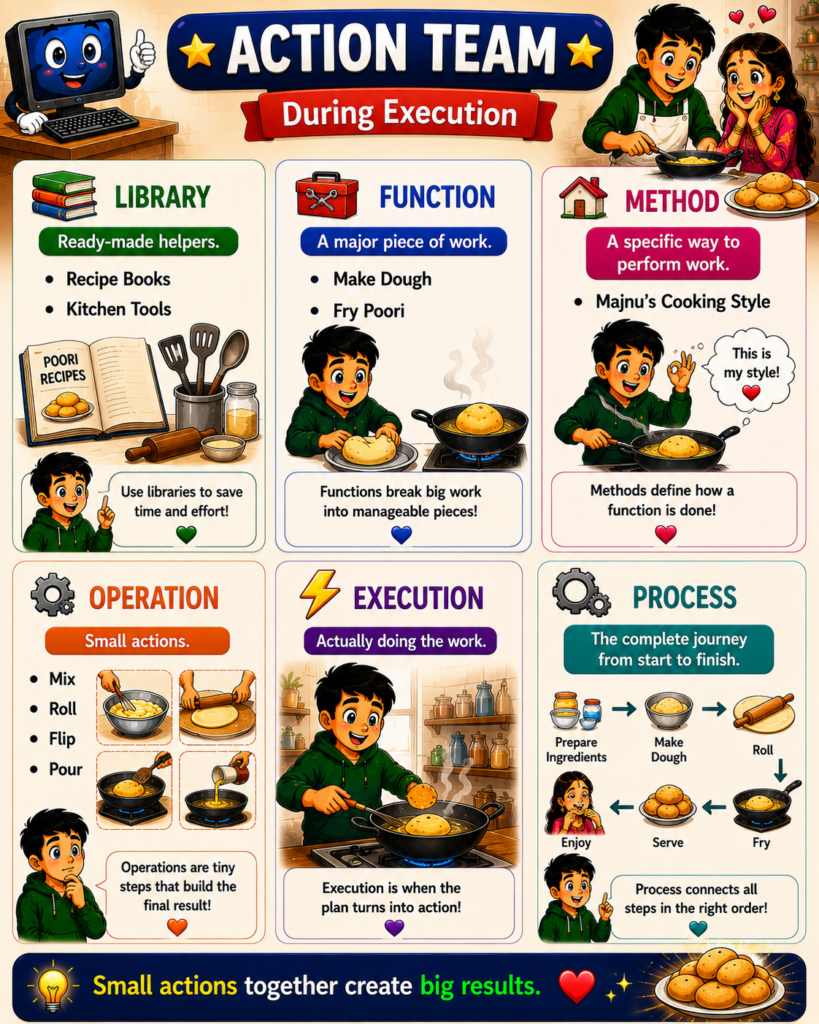
📚 Library
Libraries are ready-made helpers.
Instead of creating everything from scratch, developers reuse existing solutions.
Kitchen Examples:
📖 Recipe Books
🥄 Kitchen Tools
🧂 Ready Ingredients
Programming Examples:
📦 Spring Framework
📦 Angular
📦 React
📦 Jackson
📦 Log4j
Libraries save:
✅ Time
✅ Effort
✅ Development Cost
⸻
🧰 Function
A Function is a major piece of work.
Poori Example:
🥣 Make Dough
🔥 Fry Poori
🍽️ Serve Poori
Programming Example:
📧 sendEmail()
🧾 generateReport()
💰 calculateSalary()
Functions divide large tasks into manageable pieces.
⸻
🏠 Method
A Method defines a specific way of performing a function.
For example:
Two people may both cook Poori.
But each person may follow a slightly different style.
Similarly, a method describes how a function performs its work.
⭐ Function = What to do
⭐ Method = How to do it
⸻
⚙️ Operation
Operations are the smallest actions performed during execution.
Poori Example:
🥄 Mix
🧂 Add
🍞 Roll
🔥 Fry
🍽️ Serve
Programming Example:
➕
➖
✖️
➗
Comparison Operations
Assignment Operations
Many small operations combine to complete larger functions.
⸻
⚡ Execution
Execution is the moment when planning becomes action.
Before execution:
📖 Program exists
📝 Instructions exist
🎯 Task exists
During execution:
⚡ Instructions run
⚡ Functions execute
⚡ Operations occur
⚡ Results are produced
Execution transforms ideas into reality.
⸻
🔄 Process
A Process is the complete journey from start to finish.
Poori Example:
Ingredients
➡️ Dough
➡️ Rolling
➡️ Frying
➡️ Serving
➡️ Result
Programming Example:
Command
➡️ Task
➡️ Program
➡️ Instructions
➡️ Execution
➡️ Output
A process connects all steps in the correct order.
⸻
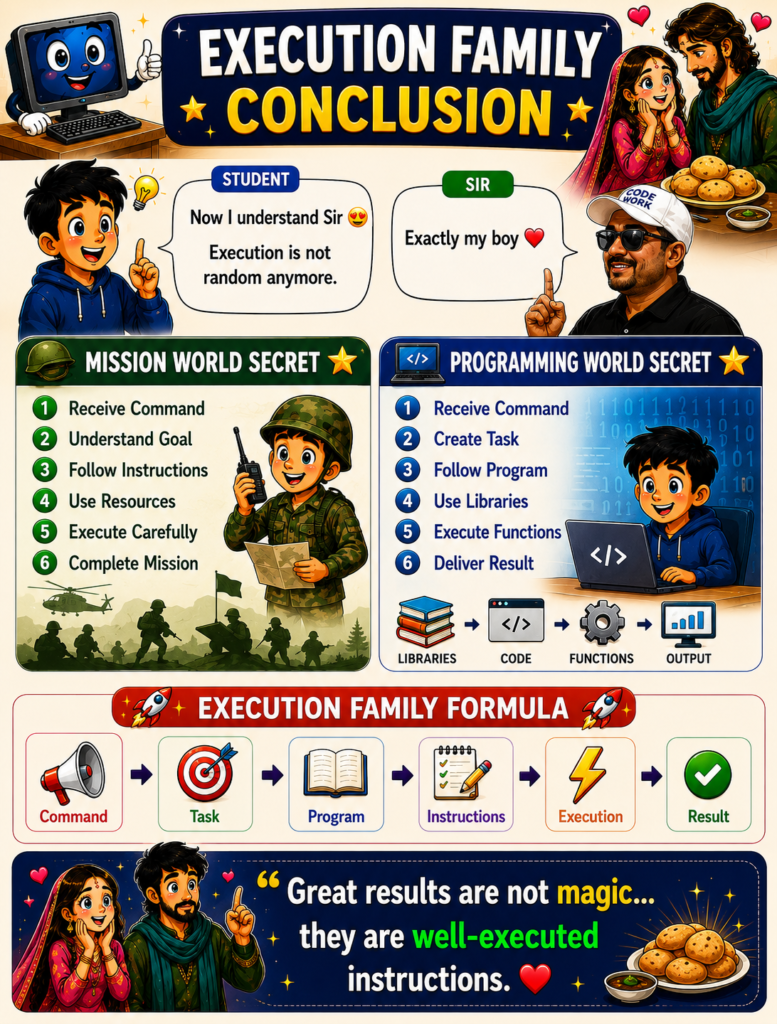
🚀 Task Execution Family Formula
Every successful execution follows:
📢 Command
➡️ 🎯 Task
➡️ 📖 Program
➡️ 📝 Instructions
➡️ ⚡ Execution
➡️ ✅ Result
This formula powers every software application in the world.
⸻
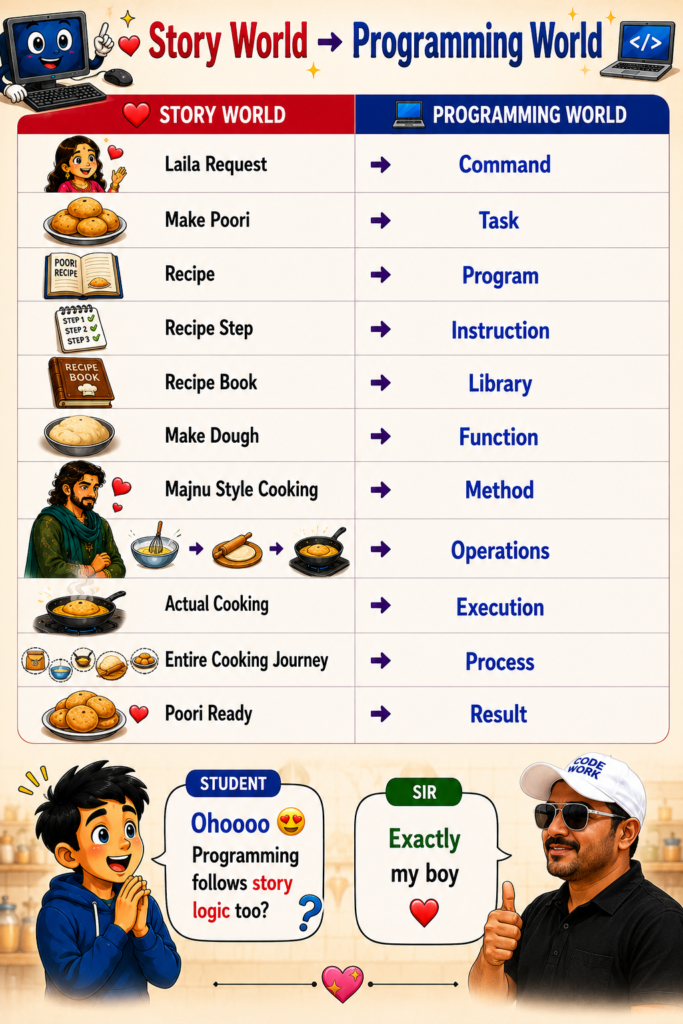
🌍 Real-World Mapping
❤️ Laila Request → 📢 Command
🍽️ Make Poori → 🎯 Task
📖 Recipe → 📖 Program
📝 Recipe Steps → 📝 Instructions
📚 Recipe Book → 📚 Library
🥣 Make Dough → 🧰 Function
👨🍳 Majnu’s Cooking Style → 🏠 Method
🥄 Mix, Roll, Fry → ⚙️ Operations
🔥 Actual Cooking → ⚡ Execution
🎉 Poori Ready → ✅ Result
Programming follows the same logic.
📌 Lesson Summary
• 🎯 A Task defines what needs to be completed.
• 📢 A Command triggers the task.
• 📖 A Program contains the complete execution plan.
• 📝 Instructions are individual steps inside a program.
• 📚 Libraries provide reusable helpers.
• 🧰 Functions divide large work into smaller units.
• 🏠 Methods define how functions perform work.
• ⚙️ Operations are the smallest executable actions.
• ⚡ Execution converts plans into action.
• 🔄 A Process represents the entire journey from start to finish.
• 🚀 Every application follows:
Command → Task → Program → Instructions → Execution → Result
• ❤️ Great results are not magic; they are simply well-executed instructions.