
Progrogramming
Basics
- Introduction
- Computers ఎందుకు కనిపెట్టబడ్డాయి?
- Computers ఎలా పనిచేస్తాయి?
- Computer నిజంగా ఏమి చేయగలదు?
- Programming Languages
- Programming Terminology
- Programming Terminology Grouping
- Storage Family
- Task Execution Family
- Input & Output Family
- Decision Family
- Repetition Family
- Collection Family
- Object-Oriented Programming (OOP)
- Access & Security Fundamentals
- Understanding Errors and Exception Handling
- APIs ద్వారా Applications ఎలా మాట్లాడుకుంటాయి?
- Understanding Databases
- Understanding Web and App Flow
- Understanding File Systems
- Understanding the Development Process
- Understanding Team Collaboration
- Understanding Software Performance
- Understanding the Mobile App Ecosystem
- Websites మీ screen వరకు ఎలా చేరుతాయి?
- Computers మనుషుల్లా ఎలా ఆలోచిస్తాయి?
- కొన్ని Programming Terms ఎందుకు అన్ని చోట్ల కనిపిస్తాయి?
Lesson 2
Computers ఎలా పనిచేస్తాయి?
ఒక Simple Real-Life Story ద్వారా… Computer లోని అన్ని Components కలిసి ఎలా పని చేస్తాయో తెలుసుకుందాం.
🤔 ఇది ఎందుకు ముఖ్యము?
మనలో చాలామంది ప్రతిరోజూ Computer లేదా Laptop ఉపయోగిస్తుంటారు.
Keyboard పై Type చేస్తాం…
Mouse తో Click చేస్తాం…
Videos చూస్తాం…
Applications Run చేస్తాం…
కానీ ఒకసారి అయినా ఆలోచించామా…
ఈ పనులన్నీ Computer లో ఎలా జరుగుతున్నాయి?
మనకు బయట కనిపించేది ఒకే Computer.
కానీ నిజానికి…
దాని లోపల చాలా Components కలిసి ఒక Team లా పని చేస్తుంటాయి.
⸻
చాలామంది Computer అంటే…
ఒకే Machine అన్ని పనులు చేస్తుందని అనుకుంటారు.
కానీ నిజానికి Computer ఒక Single Machine కాదు.
అది ఒక Well Organized Team.
ఈ Team లో ప్రతి Component కి ఒక ప్రత్యేకమైన Responsibility ఉంటుంది.
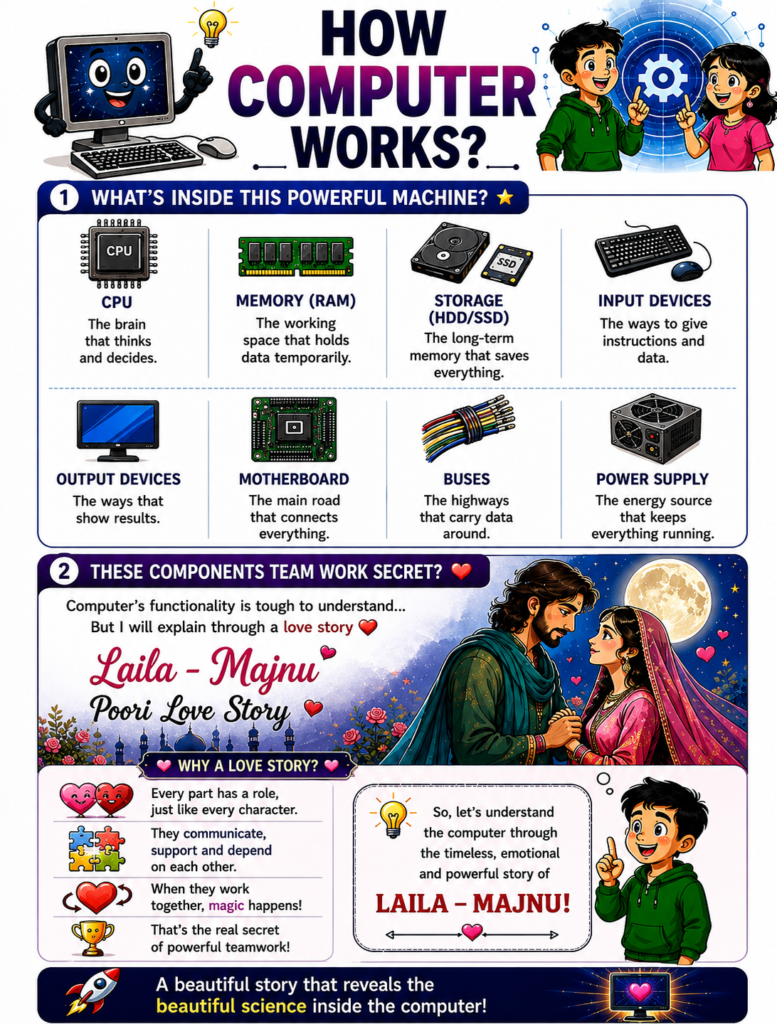
🧠 CPU అన్ని Instructions ను Process చేస్తుంది.
💾 RAM ప్రస్తుతం అవసరమైన Data ను Temporary గా Store చేస్తుంది.
📦 Storage Data ను Permanent గా Save చేస్తుంది.
⌨️ Input Devices User నుండి వచ్చే Instructions ను Receive చేస్తాయి.
🖥️ Output Devices చివరికి Result ను మనకు చూపిస్తాయి.
🏠 Motherboard ఈ Components అన్నింటినీ ఒకదానితో ఒకటి Connect చేసి Communication జరిగేలా చేస్తుంది.
ప్రతి Component తన పని సరిగ్గా చేసినప్పుడే…
Computer సరిగ్గా పనిచేస్తుంది.
⸻
ఈ Components అన్నింటినీ ఒక్కొక్కటిగా చదివితే…
కొంచెం Technical గా అనిపించవచ్చు.
అందుకే మనం మరోసారి ఒక Real-Life Story సహాయం తీసుకుందాం.
ఎలా ఒక Team లోని ప్రతి వ్యక్తి తన Responsibility పూర్తి చేస్తేనే పని పూర్తవుతుందో…
అలాగే Computer లోని ప్రతి Component కూడా ఒకదానిపై ఒకటి ఆధారపడి పని చేస్తుంది.
ఈ Concept ను అర్థం చేసుకోవడానికి…
మన Laila – Majnu Story మనకు చాలా బాగా సహాయపడుతుంది.
⸻
ఆ Story లో…
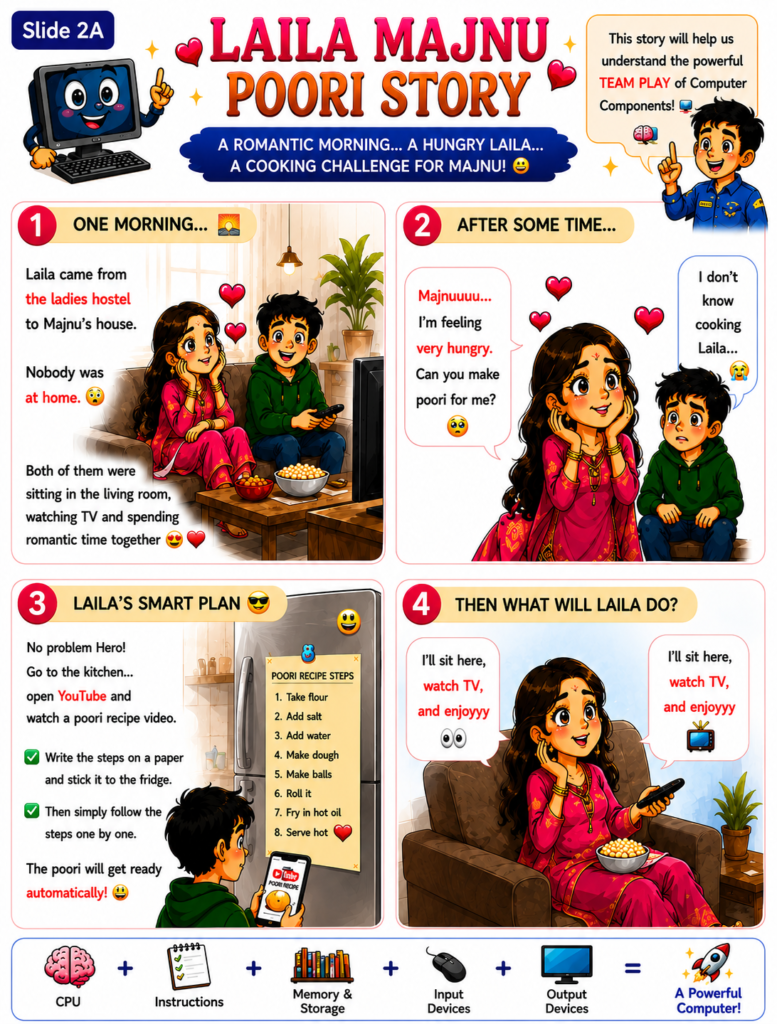
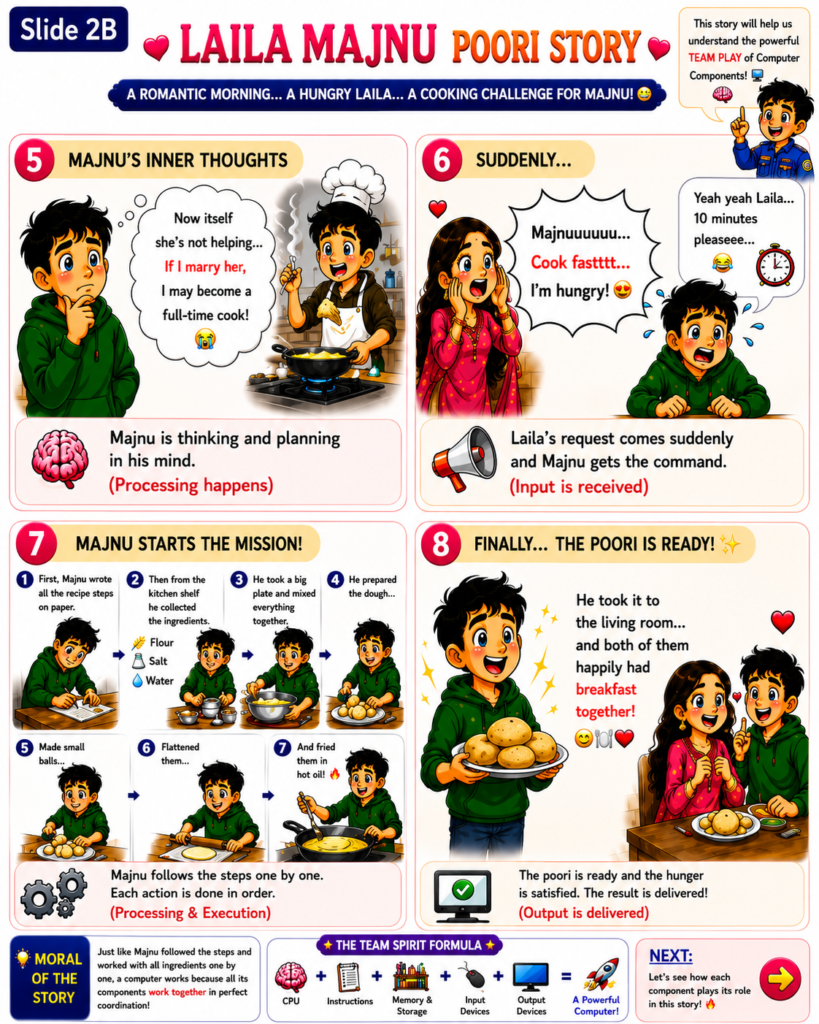
❤️ Laila ఒక Request ఇస్తుంది.
📋 Majnu ఆ Request ను అర్థం చేసుకుంటాడు.
🧠 ఎలా చేయాలో ఆలోచిస్తాడు.
📜 ఇచ్చిన Instructions ను Follow అవుతాడు.
📦 అవసరమైన Resources సేకరిస్తాడు.
✅ పని పూర్తి చేసి చివరికి Result ను Laila కి అందిస్తాడు.
Computer కూడా దాదాపు ఇదే విధంగా పని చేస్తుంది.
మొదట Input వస్తుంది.
తర్వాత Program లో ఉన్న Instructions Execute అవుతాయి.
అవసరమైన Data Process అవుతుంది.
చివరికి Output User కి చూపించబడుతుంది.
⸻
ఒకసారి ఈ Teamwork అర్థమైతే…
Programming నేర్చుకోవడం చాలా సులభంగా అనిపిస్తుంది.
అప్పుడు Software అనేది…
ఏదో Magic Code కాదు.
Computer లోని ప్రతి Component కి…
ఏం చేయాలి…
ఎప్పుడు చేయాలి…
ఎలా చేయాలి…
అని చెప్పే Instructions మాత్రమే అని అర్థమవుతుంది.
ఈ Understanding…
Software Development…
System Design…
Troubleshooting…
Performance Optimization…
ఇవన్నింటికీ Strong Foundation అవుతుంది.
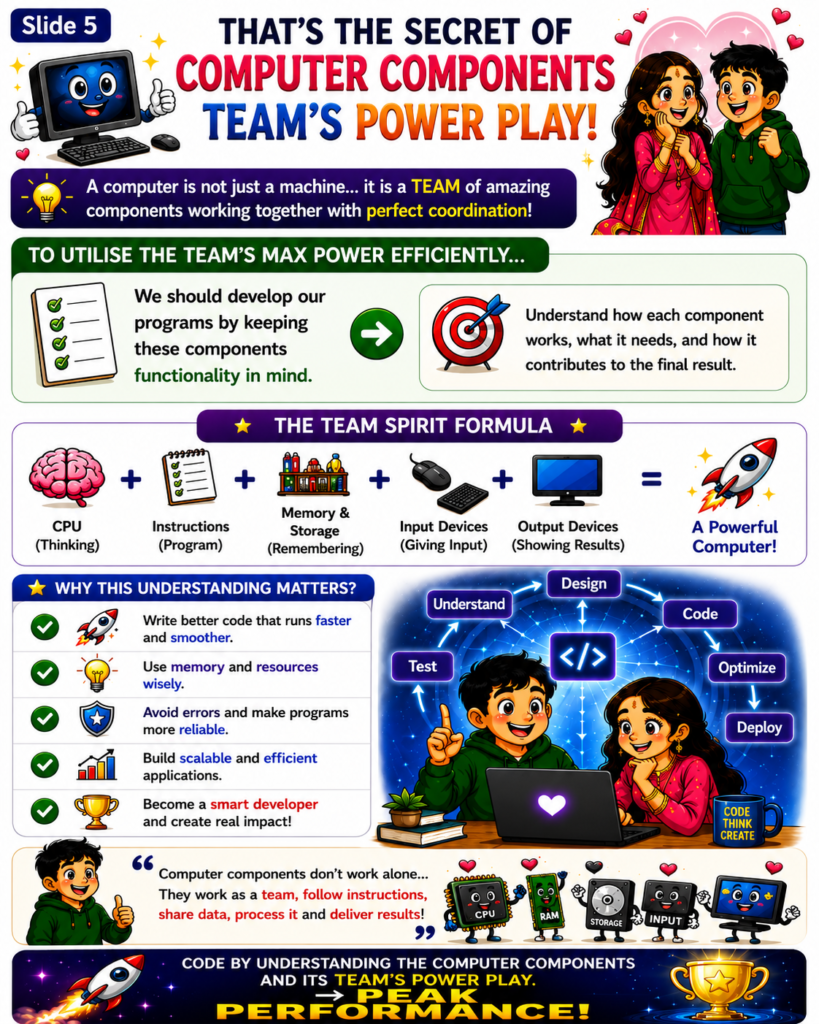
Remember Forever ❤️
Computer సరిగ్గా పని చేయడానికి…
దానిలోని ప్రతి Component తన Responsibility ను సరిగ్గా నిర్వర్తించాలి.
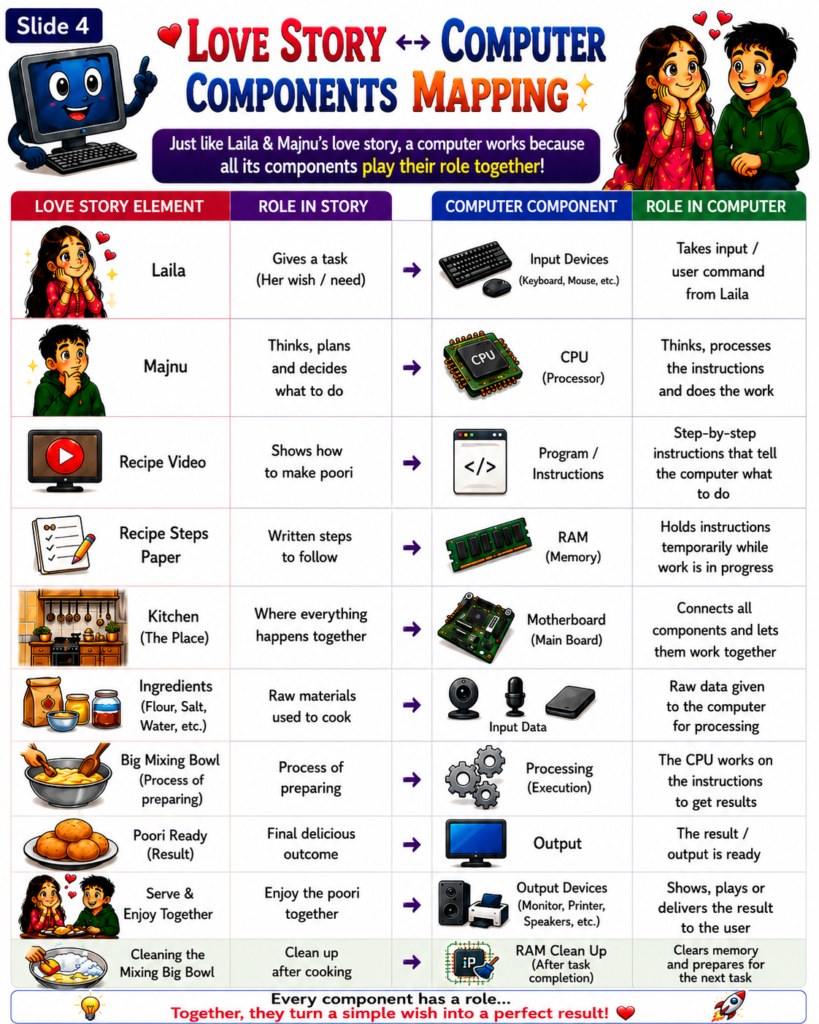
❤️ Laila = User Request
⌨️ Input Devices = Request ను Receive చేస్తాయి.
🧠 CPU = Think చేస్తుంది, Process చేస్తుంది.
📋 Program = Follow చేయాల్సిన Instructions.
💾 RAM = Temporary Working Memory.
🏠 Motherboard = అన్ని Components ను Connect చేస్తుంది.
📦 Storage = Information ను Safe గా Store చేస్తుంది.
🖥️ Output Devices = Final Result ను User కి చూపిస్తాయి.
🌟 ఎలా ఒక Successful Team కలిసి ఒక Mission Complete చేస్తుందో…
అలాగే Computer లోని అన్ని Components కలిసి…
Input ను Meaningful Output గా మార్చుతాయి.
📌 Lesson Summary
• 🖥️ Computer అనేది కలిసి పని చేసే అనేక Components తో కూడిన ఒక Team.
• 🧠 CPU అన్ని Instructions ను Execute చేసి Processing చేసే ప్రధాన Component.
• 💾 RAM Program Run అవుతున్న సమయంలో అవసరమైన Data మరియు Instructions ను Temporary గా Store చేస్తుంది.
• ⌨️ Input Devices User నుండి వచ్చే Commands మరియు Data ను Computer కి అందిస్తాయి.
• 🖥️ Output Devices Final Result ను User కి చూపిస్తాయి.
• 🏠 Motherboard అన్ని Components ను Connect చేసి వాటి మధ్య Communication జరిగేలా చేస్తుంది.
• 📋 Program అనేది Computer ఏం చేయాలో Step-by-Step గా చెప్పే Instructions సమాహారం.
• 🚀 ఈ Components మధ్య జరిగే Teamwork ను అర్థం చేసుకుంటే… Better, Faster, మరియు More Reliable Software తయారు చేయడం చాలా సులభమవుతుంది.